

For years the tower under my desk was basically a piece of furniture I kicked twice a day without meaning to. Once getting in, once getting out. My chair mat had worn a shiny track right where the case corner sat, and every few months I'd find a dust bunny the size of a mouse wedged against the intake fan. I run a home office consulting practice out of Columbus, Ohio, and I've walked into probably two hundred client offices with the exact same setup: a full tower PC parked on the floor like a doorstop, catching kicks, pet hair, and every dropped paperclip within a three foot radius.
Five months ago I finally did something about my own setup and clamped a VIVO Black Under Desk and Wall Office PC Mount to the underside of my desk, the one listed as the MOUNT-PC01. It's a steel bracket system built to hold a tower between 3.5 and 7.8 inches wide, rated for 22 pounds, with a swivel joint and a locking mechanism so the whole thing doesn't drift on you mid-workday. My tower, a mid-tower Dell OptiPlex, sits right in that range, and getting it up off the floor turned out to be one of the cheaper, more boring upgrades I've made to my office that actually mattered.
The Quick Verdict
A steel bracket that does one unglamorous job well, gets your tower off the floor and keeps it there, as long as your case fits and your desk has a lip to clamp onto.
Amazon Check Today's Price →Tired of Kicking Your PC Tower Every Time You Stand Up?
The VIVO Under Desk PC Mount clears real floor space and holds a mid-tower case up to 22 pounds with a swivel joint for easy rear port access. Check today's price and see if your tower fits.
Amazon Check Today's Price on Amazon →How I've Used It
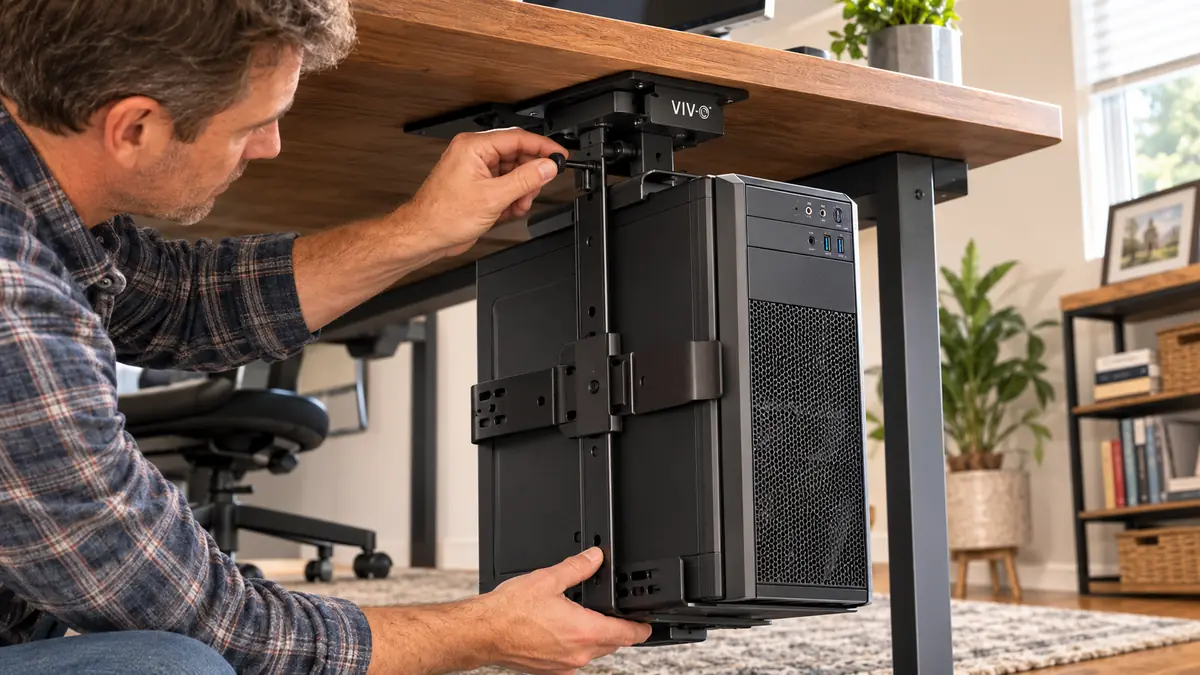
My desk is a beat-up 1962 steel tanker desk I picked up secondhand years back, no cable grommets, no fancy hooks, just a flat steel top and a shallow lip underneath on both sides. That lip is exactly what the VIVO mount clamps onto. Installing it took right around twenty minutes, most of that spent figuring out which of the two included mounting plates fit my tower's side panel screws. Once the base plate was screwed into the case, the whole assembly slid onto the desk-mounted bracket and locked with a quarter turn. No drilling into a sixty year old steel desk, which honestly is the reason I went with a clamp system in the first place.
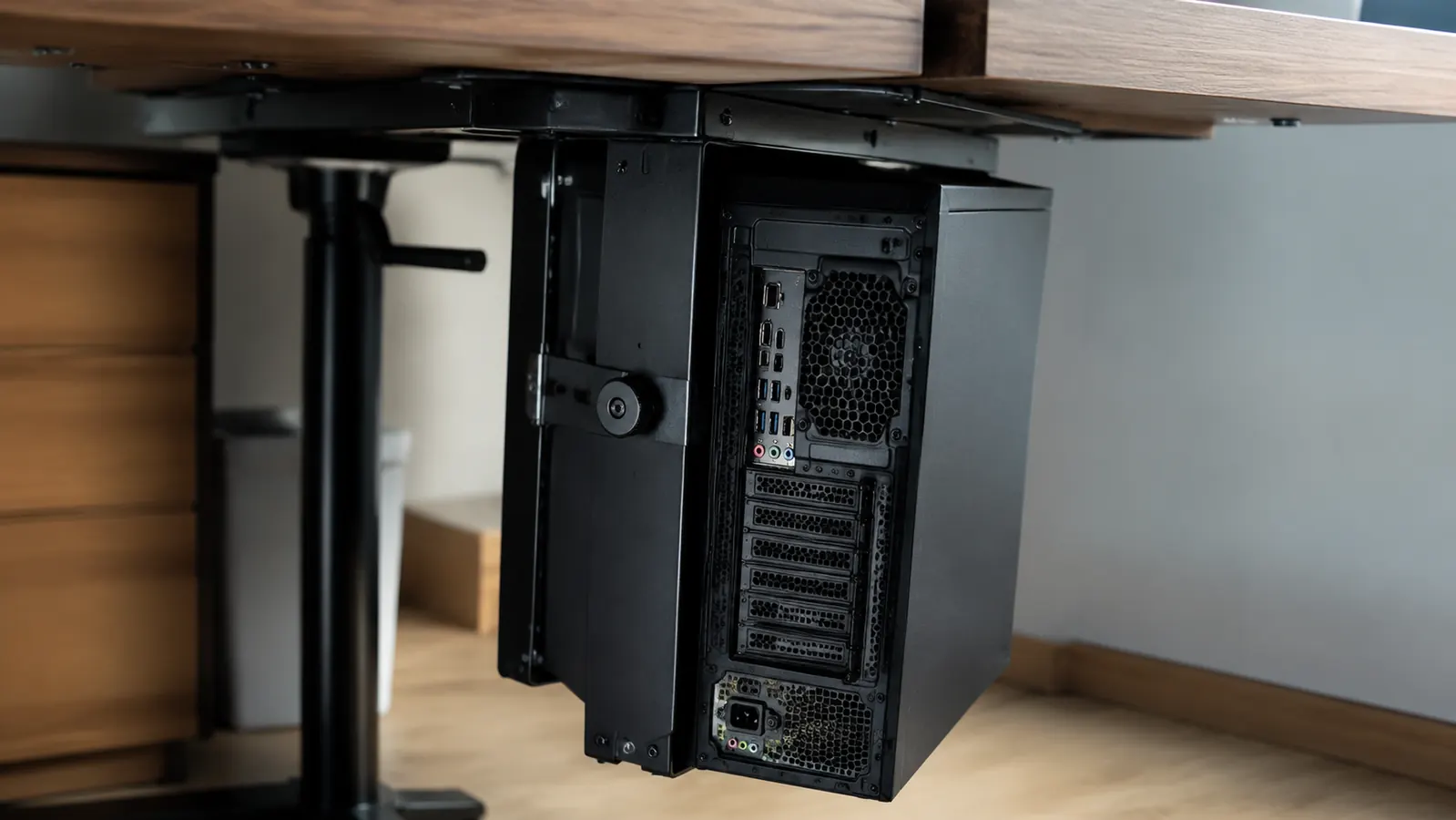
The tower itself is a mid-tower Dell OptiPlex I've had for about four years, roughly 7 inches wide at the base, right at the upper edge of what the VIVO bracket is rated for. It fit with maybe a quarter inch of play on each side, close enough that I'd tell anyone buying this to measure their case width before ordering rather than eyeballing it off a spec sheet. Once it was seated, the swivel plate let me rotate the whole tower ninety degrees to plug in a rear USB port without unmounting anything, which is a small thing that's saved me real annoyance probably a dozen times since March.
Cable management got easier too, though I didn't expect that going in. With the tower hanging under the desk instead of sitting flush against the wall behind it, I had actual working room to route the power cord, the monitor cables, and a network line without them bunching into a knot behind the case. I zip tied everything to the mount's frame itself, which meant the cables move with the tower when I swivel it instead of yanking taut and popping a connector loose, something that happened to me more than once with the old floor setup.
Day to day, I don't think about it much anymore, which is honestly the best compliment I can give a piece of hardware like this. The tower hangs about four inches off the floor, high enough that my robot vacuum clears underneath without getting stuck, low enough that it's still tucked behind my legs and out of the way when I roll my chair back. Five months in, I still catch myself glancing down expecting to kick something that isn't there anymore.
The Swivel and Lock: More Useful Than I Expected
I almost skipped the VIVO mount for a cheaper Velcro strap version that just cinches the tower to the underside of the desk. What sold me on spending a little more was the swivel joint, and after five months of using it, I think that's the single feature that separates a mount you actually enjoy from one you just tolerate. Mine locks in place with a metal pin, but pull that pin and you can rotate the tower a full range to access side panels, rear ports, or just check that the fans are actually spinning during a hot stretch in August.
The locking mechanism matters more than I expected too. Early on I tested it without locking the pin, mostly out of laziness, and the tower drifted maybe half an inch during normal desk use, nothing dangerous, but enough sway that I didn't like it hanging there unsecured. Once I locked it properly, that movement stopped completely. It's held rock steady through months of me bumping the desk with my knee, rolling my chair into the frame, and one memorable afternoon when my dog knocked into the desk leg chasing a squirrel outside the window.
I've also come to appreciate the swivel for actual maintenance, not just port access. When I added a second stick of RAM back in May, I didn't have to unmount the tower at all. I pulled the lock pin, rotated the case out until the side panel cleared the desk edge, popped the panel, made the swap, and swiveled it back into place in maybe two minutes. Compare that to the old routine of dragging a full tower out from a cramped gap under the desk, scraping the case against the desk leg every single time, and it's not close.
The bracket itself is powder coated steel, not the flimsy stamped metal I've seen on cheaper mounts I've installed for clients in the past. There's no flex in the arm when the tower is loaded, and the screws holding the case-side plate haven't backed out or loosened, which is usually the first failure point on mounts like this one. I check it every couple of months out of habit more than actual concern at this point.
Dust, Airflow, and Whether It Actually Runs Cooler
One thing I genuinely wondered before installing the VIVO mount was whether lifting the tower off the floor would change anything about temperatures. Floor level air in a lot of home offices, mine included, tends to be dustier and sometimes a few degrees warmer near the baseboards depending on the season. Over five months I've kept a loose eye on my CPU temps through the motherboard's monitoring software, and while I wouldn't call it a dramatic drop, I'm seeing idle temps roughly 2 to 3 degrees Celsius cooler on average than before the mount went up, which I chalk up to cleaner airflow into the intake fan rather than a puddle of dust sitting in front of it.
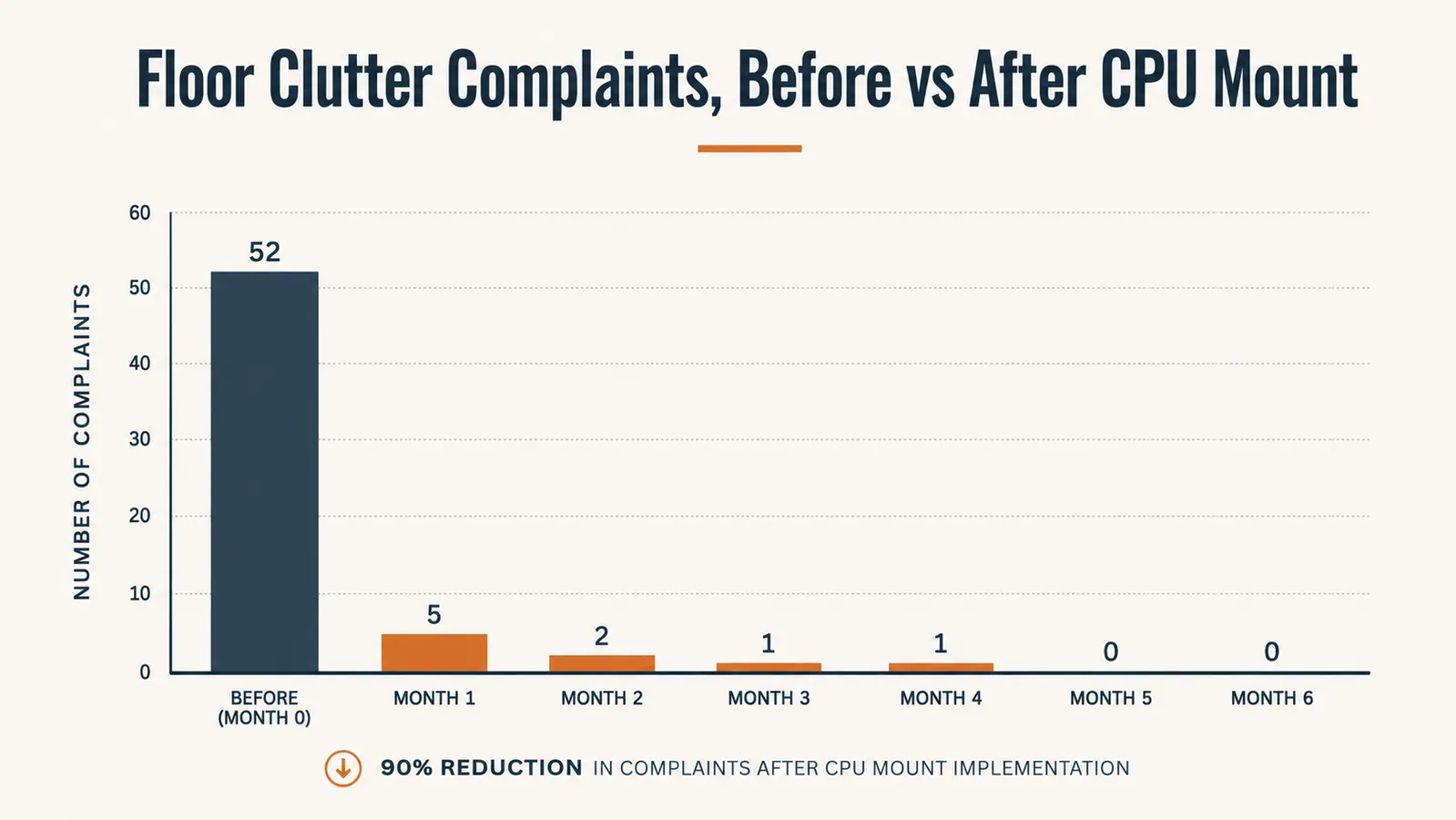
The dust difference is the bigger, more obvious win. I used to pull the side panel every couple of months and find a genuine layer of gray fuzz caked across the intake fan and front filter, thick enough that I could see it affecting airflow. Since mounting the tower up off the floor, that buildup has slowed considerably. I still clean it on the same schedule out of habit, but there's noticeably less to clean, which tracks with the tower no longer sitting directly in the path of everything that settles at floor level in a house with two dogs and hardwood floors.
Where It Falls Short
No product is perfect, and I'd be doing you a disservice if I pretended this one was. The biggest limitation is the width range. At 3.5 to 7.8 inches, it handles most mid-towers fine, but if you're running a full tower gaming rig or anything wider than about 8 inches, this VIVO mount simply won't clamp around it. I had a client with a wide full-tower case try to force it and give up. He ended up needing a different mount rated for bigger builds.
The other real limitation is desk type. Mine has a solid steel lip underneath, which gives the clamp plenty to grab onto. If your desk has a thin glass top, a rounded edge, or no lip at all underneath, you're looking at either a different mounting approach or drilling holes you may not want to put in a desk you rent or don't want to damage. I'd measure your desk's underside before ordering, not just your tower.
Weight capacity is rated at 22 pounds, which covers most towers, but if you're running a heavier case packed with extra drives and a big power supply, get an accurate weight before assuming it'll be fine. Mine weighs somewhere around 15 pounds fully loaded, comfortably inside the limit, but I wouldn't push this mount to its stated max without checking in on it more often than I do mine.
One smaller gripe worth mentioning, once the tower is mounted higher and further back under the desk, your existing cable lengths might come up short, especially the front panel USB header cable and any front audio cable if your case runs those internally to a longer route. I had to add a short extension for one USB cable that used to reach fine when the tower sat flush on the floor. Not a dealbreaker, just something to budget five extra dollars and ten extra minutes for.
What I Considered Instead
Before I bought this, I seriously considered just leaving the tower on the floor with a cheap plastic platform to keep it off the carpet, or going with a freestanding CPU stand that rolls on casters instead of clamping to the desk. I've actually run both approaches with different clients over the years and wrote up a full head to head in VIVO CPU Mount vs Leaving Your Tower on the Floor if you want the detailed comparison. Short version, a floor stand is easier to install and doesn't care about desk lip thickness, but it does nothing for the actual floor space and vacuum-robot problem I was trying to solve.
Cost-wise, the VIVO mount lands well under what I'd expect to pay for a rolling CPU stand with similar build quality, and it takes up zero additional footprint since it hangs under the desk you already own instead of adding another piece of furniture to the room. For a small office where every square foot of floor matters, that difference alone tipped the decision for me and for most of the clients I've since recommended it to.
What I Liked
- Steel bracket has stayed rock solid after five months of daily bumps and chair rolls
- Swivel joint with locking pin makes rear port access and RAM swaps painless without unmounting anything
- No drilling required, clamps onto a desk lip in about 20 minutes
- Rated for 22 lbs and fit my mid-tower Dell OptiPlex with room to spare
- Frees up real floor space for a robot vacuum and cuts down noticeably on dust buildup
Where It Falls Short
- Width range tops out at 7.8 inches, won't fit wide full-tower gaming cases
- Needs a solid desk lip or edge underneath, doesn't work well on glass or lipless desks
- Fit was snug on my tower, worth measuring your case width before ordering
- Swivel pin needs to be manually locked or the tower can drift slightly
- Existing internal cables may come up a few inches short once the tower sits higher and further back
I didn't buy this to make my office look nicer. I bought it so I'd stop kicking a steel box every time I stood up. Five months later, that's exactly what it did, nothing more, nothing less.
Who This Is For
This is the right pick if you've got a mid-tower PC sitting on the floor collecting dust and cable clutter, and your desk has a solid lip or edge underneath to clamp onto. It's also worth it if floor space is tight, whether that's for a robot vacuum, a second chair, or just so you stop stubbing your toe every afternoon. I wrote up a shorter, more personal version of this exact situation in how an under-desk CPU mount cleared my home office floor if you want the quick story instead of the full breakdown. And if you want the fuller list of reasons this kind of mount helps beyond just decluttering, I broke it down further in 10 Reasons an Under-Desk CPU Mount Helps Your Workflow.
Who Should Skip It
Skip the VIVO mount if you're running a full tower case wider than about 8 inches, or if your desk doesn't have a lip, edge, or solid surface underneath to clamp onto. Glass desks and floating shelf-style desks are the two setups I'd steer people away from without a different mounting plan first. It's also not worth it if you rarely move your tower or access the rear ports, since the swivel feature is a good chunk of what makes the current price worth it, and someone who never touches the back of their PC won't get full value out of that part of the design.
Ready to Get Your Tower Off the Floor for Good?
Five months in, the VIVO Under Desk PC Mount is still holding my Dell OptiPlex steady with zero drift and a swivel that actually gets used. Check today's price and specs on Amazon before you decide.
Amazon Check Today's Price on Amazon →