
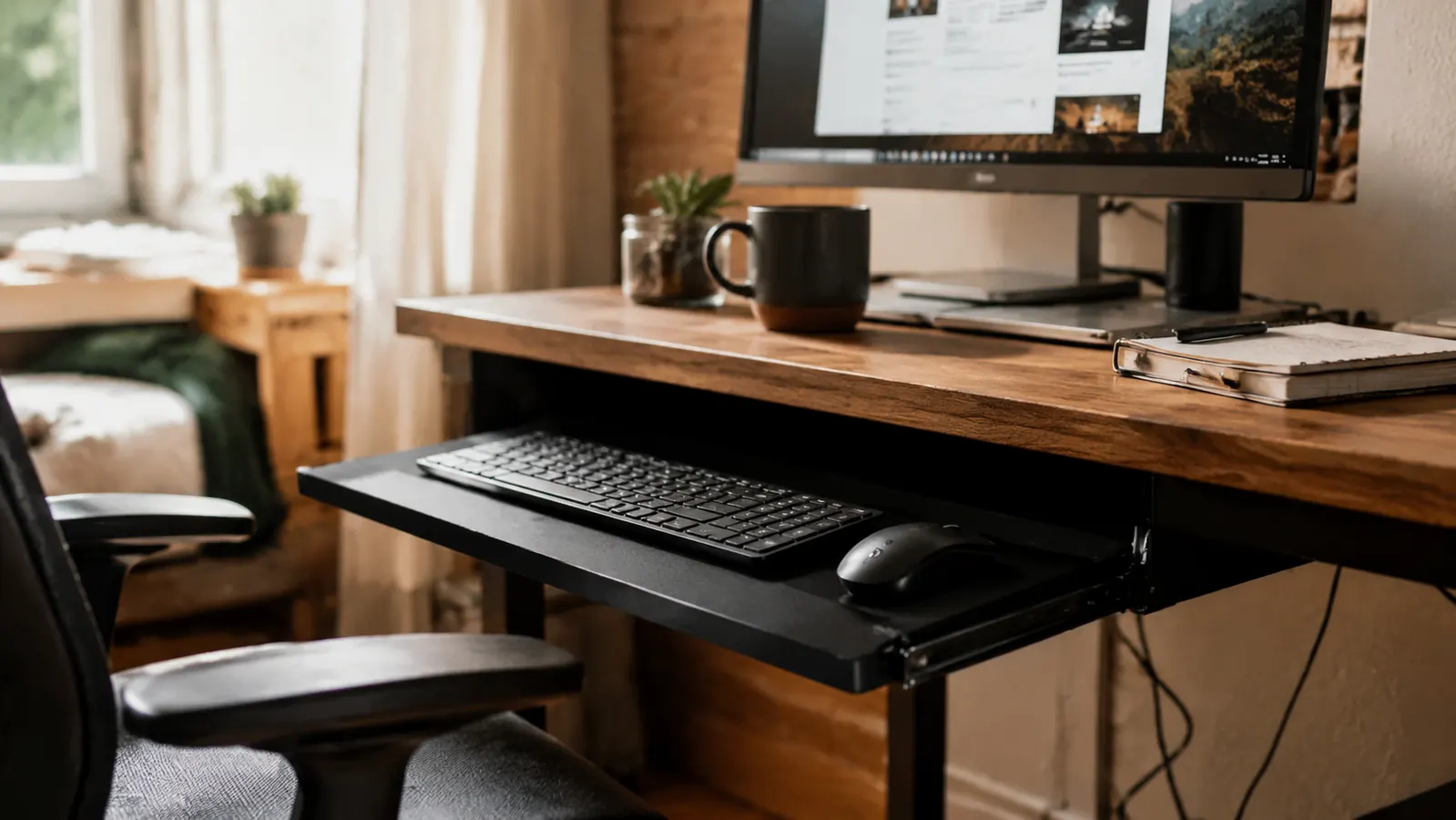
My name is Gordon Pratt. I've spent close to twenty years running remote and hybrid operations teams out of a home office here in Columbus, Ohio, and for most of that time my keyboard sat directly on top of the desk, same as everyone else's. My desk sits a little high for my chair, something I never fixed because I rent and didn't want to drill into a desk that isn't mine or buy a new one just to solve a height mismatch. By early this year my wrists were sore by 3pm most days, enough that I started dreading the second half of my workday. I ordered the VIVO Small Keyboard Tray mostly because the listing promised a clamp-on mount with no drilling required, which meant I could try it without committing to anything permanent on a desk I don't own outright.
That was six months and a lot of typing ago. I've run status calls on it, written proposals on it, and pulled it back in and pushed it out probably a thousand times by now. This review is what I actually noticed using the VIVO keyboard tray as a daily work tool, not a first-impressions unboxing, after half a year of real use in my own home office.
The Quick Verdict
A sturdy, genuinely no-drill clamp-on keyboard tray that dropped my end-of-day wrist soreness noticeably, with a real learning curve on clamp placement and a slide mechanism that needed one small fix along the way.
Amazon Check Today's Price →Wrists Sore by Mid-Afternoon and Renting Your Space?
If your desk sits too high and you can't drill into it because you don't own it, the VIVO keyboard tray clamps on and off without leaving a mark. See today's price on Amazon.
Amazon Check Today's Price on Amazon →How I've Used It
My setup is simple. The VIVO tray sits clamped under the front edge of my desk, and my keyboard and mouse live on it full time now instead of on the desktop above. On a typical weekday I'll pull the tray out first thing, before I even open my laptop, and it stays extended for most of the day unless I need the desk surface clear for paperwork or a client leaves a folder open on a call. I didn't expect to keep it out constantly, I figured I'd slide it in and out depending on the task, but six months in, out is just the default position.
I run three to five video calls most weekdays managing a distributed operations team across two time zones, plus a steady stream of typing for reports, scheduling, and email. I've used the VIVO tray through every kind of task, from quick Slack replies to two-hour planning documents, and the difference I noticed wasn't dramatic in any single session, it built up over weeks. My forearms used to rest at an angle that pushed my wrists up toward the desktop keyboard height. Now they sit flat and level, because the tray puts the keyboard a few inches lower than the desk surface, closer to where my elbows naturally fall.
The tray also changed how I sit without me trying to change anything. Because my keyboard is lower now, I stopped hunching my shoulders up toward it the way I used to when it sat on the desktop. That's a side effect of the height change, not something I consciously worked on, and it's probably the biggest overall shift six months of use has made in how I sit through a workday.
The Clamp Mount and Build Quality
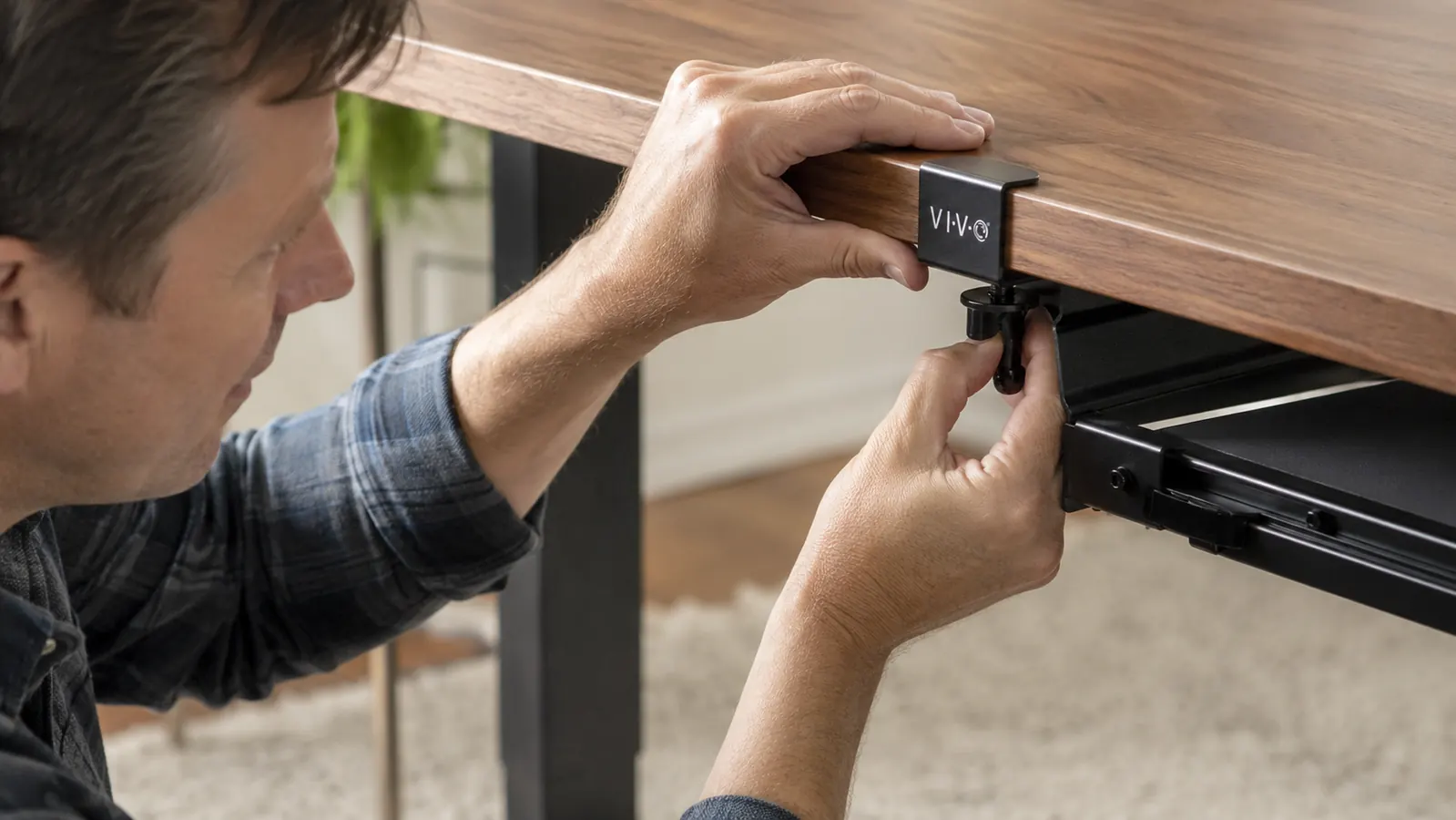
The VIVO Small Keyboard Tray ships as a metal track platform with two heavy-duty C-clamps that bolt onto the underside of the desk edge. Installation took me about twenty-five minutes with the included hardware and an Allen wrench that came in the box. The clamps tighten by hand, no drilling, and once cranked down they haven't loosened or slipped in the six months since I mounted them, even with the daily sliding in and out. The platform itself is a slide-out track system, roughly 20 inches wide before the clamps, with a smooth pull-out and push-in motion on ball-bearing rails.
The C-clamp system is the reason I picked VIVO over a couple of cheaper trays I looked at that used adhesive mounting brackets instead. My desk has a rounded front edge, and I was worried a clamp wouldn't seat properly, but VIVO's clamps have enough range in the screw depth to grip edges from about half an inch up to a couple of inches thick. That flexibility mattered because I've since moved this tray to a second desk in my office when I rearranged furniture, and it clamped onto a completely different edge profile without any issue.
The platform surface itself is a hard plastic, not padded, which I was neutral on going in. It's held up fine, no cracking or flexing under the weight of a full-size keyboard and a mouse, and the black finish hasn't scuffed or faded despite sun coming through my office window most afternoons. The one mechanical issue I ran into came around month three, when the slide started catching slightly on the push-in motion. A drop of household oil on the rail tracks fixed it in under a minute, and it's run smooth since.
Six Months of Lower, Flatter Typing
The real test of any desk accessory isn't the first week, it's whether you're still using it six months later without thinking about it. I am, every single workday. The VIVO tray hasn't become a novelty item shoved under the desk and forgotten, it's the thing my hands touch first every morning and last every evening.
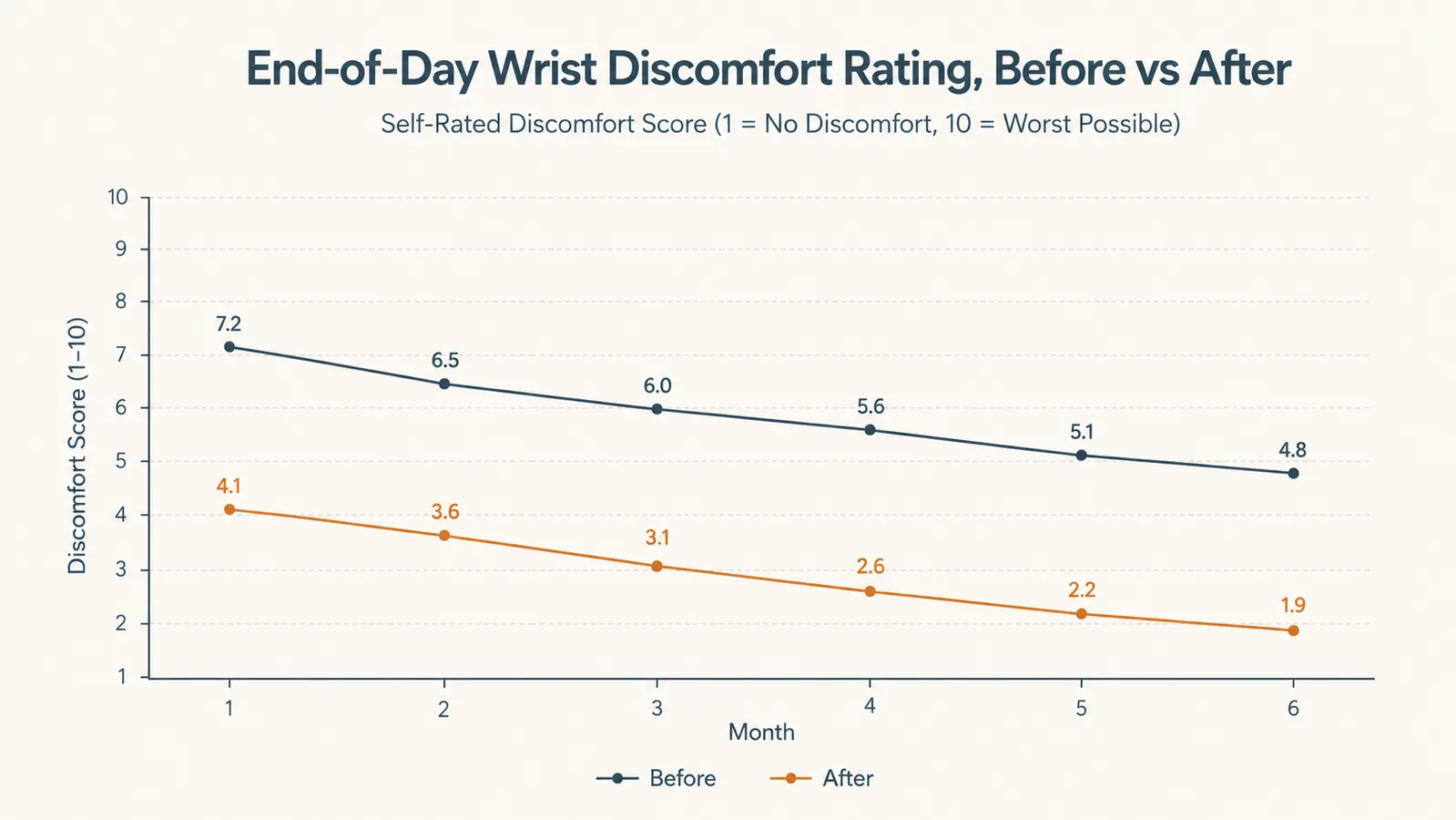
I started keeping a rough note of how sore my wrists and forearms felt by the end of the day, rating it one to ten most evenings, mostly out of curiosity after a friend asked whether the tray was actually helping or just felt different. In the month before I installed the VIVO tray, that number averaged somewhere around a six or seven most days, especially after long report-writing stretches. Over the last two months of consistent use, it's averaged closer to a two or three. That's not a clinical study, it's one guy's evening notes app, and I want to be clear the VIVO tray isn't treating or curing anything, it's just changed the angle my hands sit at for eight hours a day, which is exactly what I was hoping it would do.
The adjustment period was short. For the first few days, my typing felt slightly off because my hands were lower relative to my monitor than they'd been for years, and I caught myself glancing down more than usual to check finger placement. That faded within a week as muscle memory caught up, and now I don't think about the height difference at all, it's just where my keyboard lives.
Why I Considered Just Raising My Chair Instead
Before ordering the VIVO tray, I looked at simply raising my office chair to match the desk height and adding a footrest to compensate. Two things pushed me toward the keyboard tray instead. First, raising the chair meant my monitor, which sits on a fixed riser, would have ended up too low relative to my eye line, trading one ergonomic problem for another. Second, and this is the bigger one for me, I rent my office space and didn't want to keep swapping furniture configurations every time I moved. A clamp-on tray solves the height mismatch directly at the keyboard, without touching the chair, the desk, or the monitor setup at all.
I'm not going to claim the tray is a universal fix for every desk height problem, because it isn't. If your issue is a monitor that's too low or a chair that doesn't adjust, a keyboard tray won't touch either of those. But for the specific problem of a keyboard sitting too high relative to your elbows, which was exactly my situation, VIVO's tray solved it more directly than rearranging the rest of my setup would have.
The Tradeoffs I've Made Peace With
The biggest tradeoff is desk clearance under the clamps. The VIVO mounting hardware takes up real space under the desk edge, and if you keep a rolling file cart or storage bin tucked under there, you'll likely need to shift it. I had to move a small drawer unit about four inches to the left to clear the clamp brackets, which was a minor annoyance but worth mentioning since most listings don't call it out.
Mouse space is the second thing I underestimated. The tray platform fits a full-size keyboard comfortably, but a standard mouse pad barely squeezes onto the remaining width. I ended up switching to a smaller mouse pad specifically to make room, which solved it, but I wish I'd measured my keyboard and mouse combined width against the tray's listed dimensions before ordering rather than assuming it would fit.
Desk thickness is worth double-checking too. My desk edge falls comfortably within VIVO's clamp range, but I have a friend with a thicker built-in desk who couldn't get the clamps to seat properly and had to return a similar tray for that reason. It's a quick measurement before you buy, and it's the one thing that determines whether this works for your desk at all.
On the plus side, the whole system came apart just as easily as it went on when I moved it to my second desk, no residue, no marks, no leftover holes. That reversibility is the entire reason I bought a VIVO tray instead of a fixed under-desk shelf, and six months of taking it on and off has confirmed it does exactly what the listing promised.
What I Liked
- Noticeable drop in end-of-day wrist and forearm soreness after the first week of adjustment
- True no-drill C-clamp mount, removable and reusable on a different desk edge without damage
- Smooth ball-bearing slide that's stayed reliable with one quick oil fix at month three
- Solid platform that hasn't cracked, flexed, or discolored under six months of daily use
- Clamp range flexible enough to fit both a rounded desk edge and a squared one
Where It Falls Short
- Clamp hardware eats into under-desk storage space, may require rearranging a drawer or cart
- Tight fit for a full-size keyboard plus a standard mouse pad, smaller pad recommended
- Not compatible with very thick built-in desk edges, measure before buying
- Hard plastic surface, no wrist padding included
In the month before I installed the VIVO tray, my evening wrist soreness averaged a six or seven. Over the last two months, it's averaged closer to a two or three.

Who This Is For
If you spend most of your workday typing, the way I do running operations for a team I mostly only see on a screen, and your desk sits taller than what's actually comfortable for your elbows, the VIVO keyboard tray is a straightforward fix worth trying. It's a strong fit for renters and anyone who doesn't want to commit to drilling into furniture, and the clamp-on mount means you can take it with you if you move desks or move apartments entirely, which I've now done once myself. Anyone comparing a clamp-on tray against simply typing directly on a fixed desk should read our companion piece on VIVO keyboard tray vs. fixed desk typing for a side-by-side look at both approaches.
Who Should Skip It
If your desk edge is unusually thick, built-in, or has an odd profile that doesn't leave room for a standard C-clamp, measure carefully before you buy, since that's exactly where a tray like this can fail to mount properly. And if you're tight on under-desk storage already, plan on rearranging something, the clamp hardware does take up space. For anyone who wants more detail on the actual install process before committing, we walked through it step by step in how a clamp-on keyboard tray saved my wrists, which covers the same mounting process from a different angle.
Ready to Stop Typing at the Wrong Height Every Day?
Six months in, my evening wrist soreness has dropped from a six or seven down to around a two or three most days. The VIVO Small Keyboard Tray is the no-drill fix I wish I'd tried a year sooner. See today's price on Amazon before it changes.
Amazon Check Today's Price on Amazon →