

I've built out probably forty home office setups for coworkers, clients, and neighbors here in Columbus over the last decade, and I'll tell you straight: most reviews of clamp-on keyboard trays leave out the parts that actually matter once the box is open. They show you a clean stock photo of a tray gliding out under a spotless desk and never mention what happens when your desk isn't spotless, or thin, or perfectly flat. This is that other review. I've had the VIVO Small Keyboard Tray bolted under my own desk for a full work-from-home year now, and I want to walk through what nobody put in the marketing copy, the good and the genuinely annoying.
Here's the short version up front, since I'd rather you know it now than dig for it: I still use this VIVO tray every single day, I'd buy it again, and it fixed the wrist ache that sent me shopping for a tray in the first place. If you want the setup story and the six-month durability numbers, I already covered that in my other VIVO Keyboard Tray review. This piece is different. This is the honest version, the one that covers desk compatibility, the wobble at full extension, and the three or four things I wish someone had told me before I clamped mine into place.
The Quick Verdict
A genuinely solid clamp-on tray that fixed my wrist pain, but check your desk thickness and expect some give at full extension before you buy.
Amazon Check Today's Price →Still Typing Directly on Your Desk? Your Wrists Are Keeping Score.
The VIVO Small Keyboard Tray clamps on in well under an hour, no drilling, and drops your keyboard down to a neutral typing angle. See today's price and current availability on Amazon.
Amazon Check Today's Price on Amazon →What I Actually Set Out to Test
I didn't buy this VIVO tray to review it, at least not at first. My right wrist had started aching by mid-afternoon most days, the dull kind of ache that shows up after a decade of typing on desks that were never built with ergonomics in mind. A physical therapist friend told me flatly that typing on a 29 or 30 inch high desk with my elbows above 90 degrees was probably most of the problem, and a keyboard tray was the cheapest fix worth trying before I spent money on a new desk entirely. I looked at four or five options and landed on VIVO mostly because of the clamp rating and the review count, over 14,000 at the time, which felt like enough data to trust for a 46 dollar purchase.
My desk is a 60 inch laminate top on metal legs, about an inch and a quarter thick at the front edge where the clamps needed to grip. That thickness matters more than most buying guides let on, and it's the first thing I want to cover honestly, because it's where a chunk of the one-star reviews online actually come from, not from a bad product but from a mismatch nobody checked for ahead of time.
The Desk Thickness Problem Nobody Warns You About
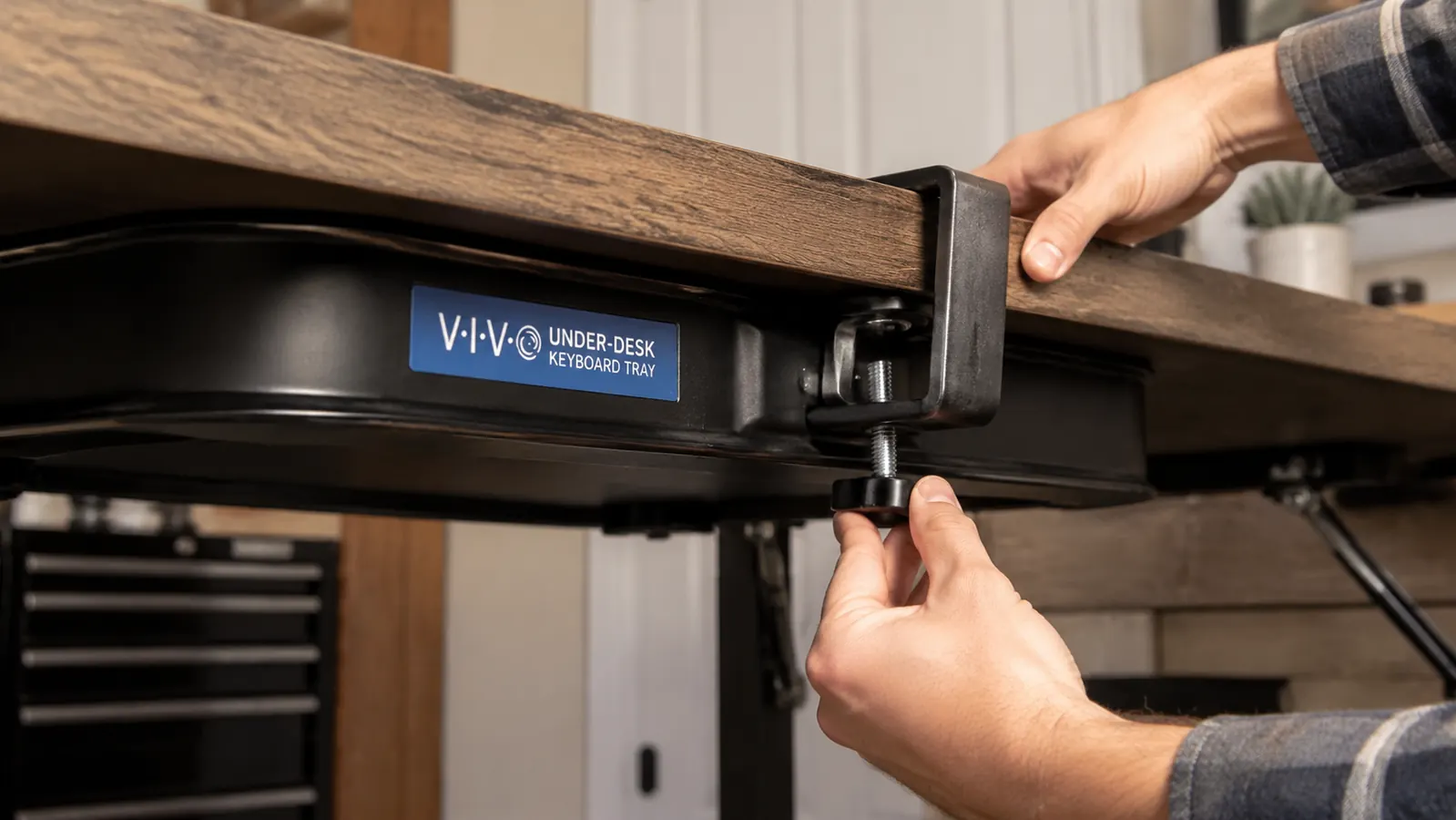
VIVO lists a clamp range on the product page, and I'll admit I skimmed right past it the first time, the same way most people do. My desk fell right in range, so I got lucky. But I've since helped two people try to install this same tray on desks that were either too thin, like a hollow-core desk under three quarters of an inch, or had a rounded front edge instead of a flat one, and the clamps either couldn't get enough bite or left visible pressure marks in the laminate. Nobody mentions in the glowing reviews that this is a clamp-on system, not a magic one, and it needs a flat, solid edge to actually work the way it's designed to.
If your desk has a rounded front lip, a glass top, or is thinner than about three quarters of an inch, measure before you buy rather than after. I wish I'd known to tell my neighbor that before she ordered one for her glass desk and had to send it back. It's a fifteen-second check with a tape measure that saves you a return shipping label.
There's a second wrinkle here that took me longer to figure out than I'd like to admit. If you're also running a clamp-mounted monitor arm on the same desk, the two clamps sometimes want the same six inches of usable edge, especially on a corner desk or anything narrower than 48 inches. I had to shift my monitor arm about eight inches to the left to give the tray clamps room to seat properly without the two fighting for the same grip point. Measure both clamp footprints together if you're installing them at the same time, not just one at a time, or you'll end up moving one of them twice like I did.
The Wobble at Full Extension, and When It Actually Matters
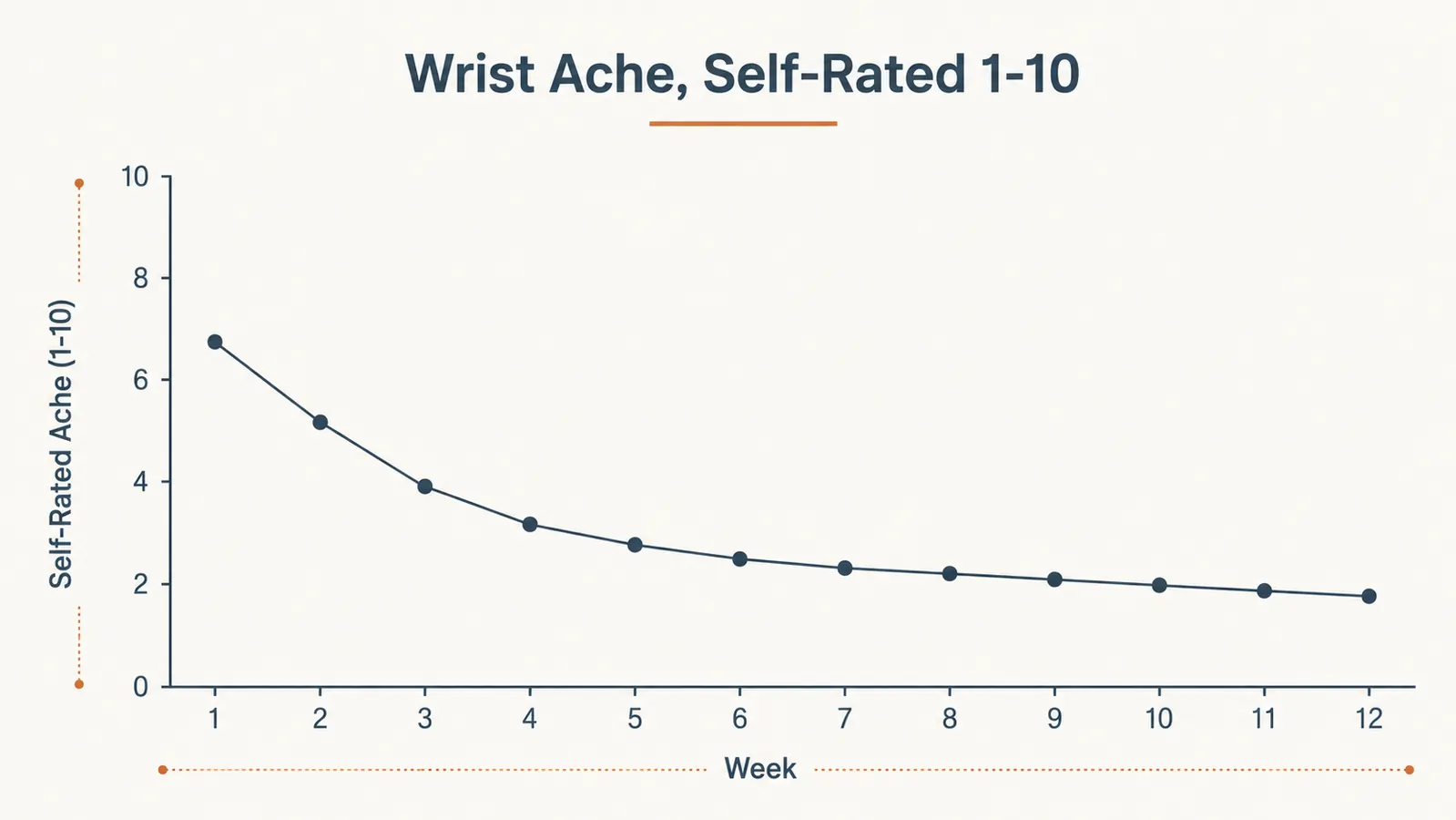
Here's the thing almost nobody mentions in the five-star reviews: when you pull the tray all the way out to its full 20 inch reach, there's a noticeable amount of give if you lean on it or type aggressively. It's not dangerous, and it's never once dropped anything, but if you're the kind of person who rests your palms hard on the platform or bangs out emails like you're annoyed at the keyboard, you'll feel it flex slightly at full extension. Pulled in three or four inches from max, it's rock solid. Fully extended, there's a little bounce.
I didn't notice this in the first two weeks because I hadn't found my ideal position yet. By month three I'd settled into using it about 80 percent extended rather than maxed out, and the wobble basically disappeared from my daily experience. It's a small adjustment, but it's exactly the kind of thing that never makes it into a review written after day two.
Installation Took Longer Than the Box Promised
The listing says tool-free, and technically it is, the clamps use a hand crank rather than a wrench. But no tools and quick install turned out to be a little optimistic for me. Getting the tray level took closer to 35 minutes because my desk has a slight warp near one corner, and I had to shim one clamp with a folded piece of cardboard to keep the tray from sitting crooked. That's not a defect in the tray, it's just real-world desk manufacturing, but the box copy doesn't account for it.
If you want the full step-by-step, including how I fixed the leveling issue without extra hardware, I wrote up the whole install process here. Short version for this review: budget closer to 30 to 45 minutes your first time, have a folded piece of cardboard or a thin shim on hand just in case, and don't fully tighten the second clamp until you've confirmed the tray sits level with a level app on your phone.
The Add-On Nobody Mentions: You'll Probably Want a Wrist Rest Too
This is the one that surprised me most. The tray platform itself is flat with a slight lip at the front edge, and after about a month I noticed my wrists were resting directly on that lip during longer typing sessions, which created a new, smaller pressure point in a spot that had never bothered me before. It's not a flaw in the tray, it's just what happens when you lower a keyboard onto a hard platform without adding any padding underneath your wrists to match the new angle.
I added a gel wrist rest around week five and the small ache disappeared within days. None of the product photos show one in use, and none of the reviews I read beforehand mentioned needing one, but I'd now consider it close to mandatory rather than optional if you're using the tray more than a couple hours a day. Budget the extra cost into the real expense of fixing your wrist pain, because the tray alone got me most of the way there but not all the way.
Living With It: The Small Annoyances After a Year
A full year in, the tray itself has held up fine, no cracking, no sagging under the weight of a keyboard and a mouse pad riding along the extended platform. But there are small daily frictions worth naming. My rolling desk chair occasionally catches the underside of the tray when I scoot in fast, which took me longer to unlearn than I'd like to admit. And if you like to prop your feet up under the desk, the support arms eat into that space more than you'd expect from the photos.
The sliding rails have also picked up a faint metal-on-metal sound over the year, nothing that affects function, but it's there if the room is quiet. A drop of household oil on the rails around month eight took care of most of it. None of this is a dealbreaker for me, but it's the kind of maintenance note that never shows up in a launch-week review because nobody's owned the thing long enough yet to notice.
The other thing I'll mention, because it's small but real, is that pushing the tray fully back in under the desk when it's not in use isn't quite as seamless as I expected. My chair arm clips the front edge if I roll in at the wrong angle, so I've gotten in the habit of tucking the tray in before I stand up rather than after I roll back. It's a minor routine change, but it took a couple of bruised knuckles before I built the habit.
What Actually Fixed My Wrists
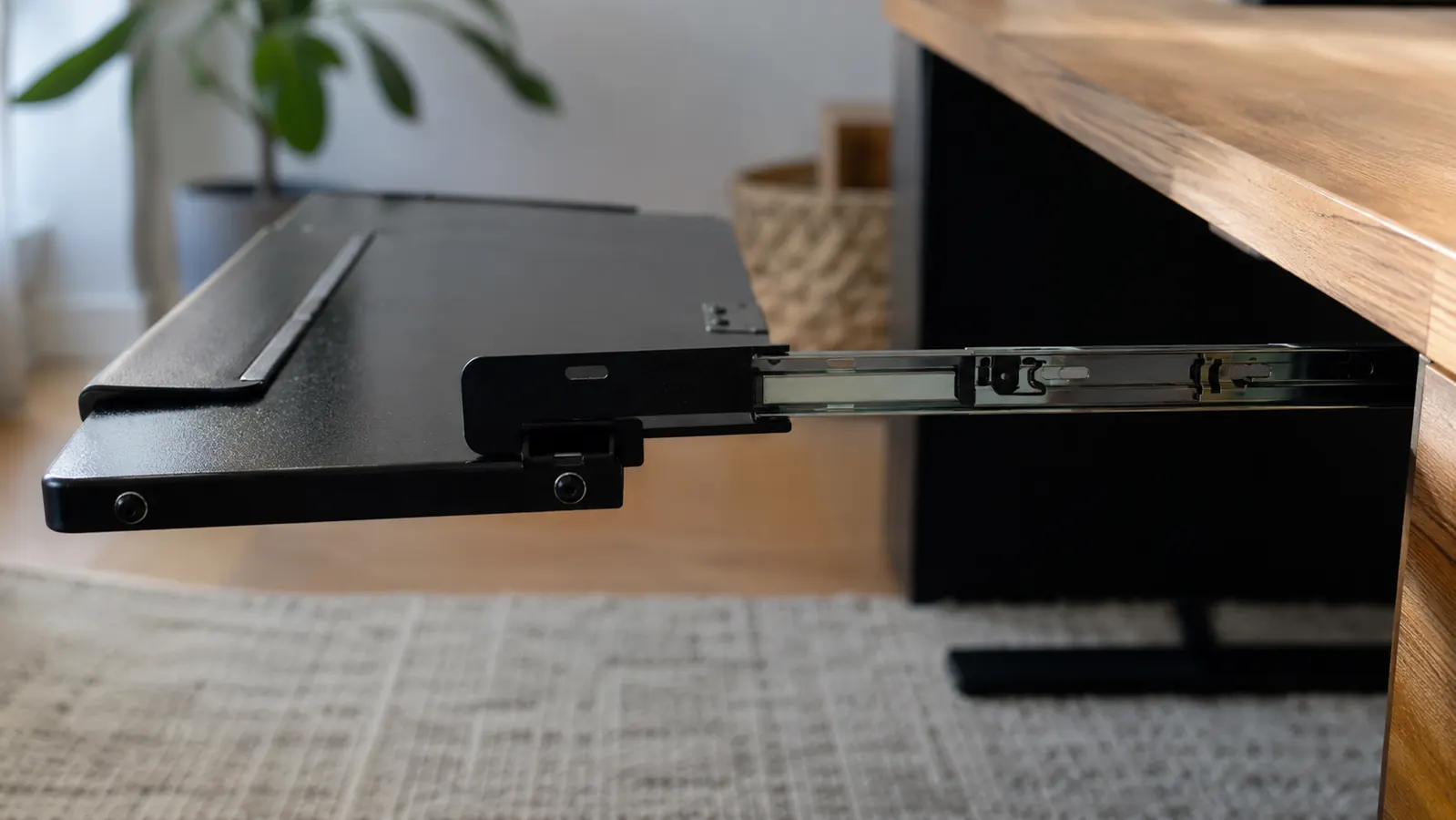
The wrist ache is genuinely gone, and I want to be specific about why, because the tray by itself wasn't a magic fix, the angle was. Sitting the keyboard about three inches lower than my desk surface put my forearms roughly parallel to the floor for the first time in years, and that neutral wrist position is doing the actual work here. If you're curious about the mechanics of why that matters, I broke down ten specific reasons a keyboard tray fixes wrist pain in a separate piece that goes deeper into the ergonomics than I have room for here.
It took about three weeks before I noticed the ache was gone rather than just less frequent. That's slower than I expected going in, and if you're hoping for overnight relief, temper that expectation. Your body needs a few weeks to actually adapt to a new typing angle, same as breaking in new shoes.
What I Liked
- Genuinely fixed a chronic wrist ache within about three weeks of consistent use
- No drilling required, clamp system works well on standard 1 to 2.5 inch thick desks
- Slide rails still smooth after a full year, minor oiling needed around month eight
- 20 inch platform comfortably fits a full-size keyboard and a mouse pad side by side
- Solid, no-flex feel when the tray isn't pulled to full extension
Where It Falls Short
- Noticeable wobble and flex when extended to the full 20 inches, especially when typing aggressively
- Clamps struggle on rounded front edges, glass desks, or anything under three quarters of an inch thick
- Real install time is closer to 30 to 45 minutes than the quick, tool-free install the listing suggests
- Front lip creates a new wrist pressure point unless you add a separate wrist rest
- Rolling chairs can catch the underside of the tray if you scoot in quickly
The wobble at full extension isn't a flaw exactly, it's a limit. Learn where it is, stay inside it, and you'll forget it's even there.
Who This Is For
If you're dealing with wrist or forearm ache from typing directly on a standard height desk, and your desk has a flat front edge somewhere between three quarters of an inch and two and a half inches thick, this VIVO tray is one of the cheapest real fixes available. It's also a solid pick if you've already read the longer six-month durability breakdown and want the shorter, more skeptical version before committing, or if you're weighing a tray against just adjusting your existing setup and want the honest tradeoffs laid out first.
Who Should Skip It
Skip it if your desk is glass, has a rounded or beveled front lip, or is on the thin side, measure first. Skip it too if you're already running a clamp-mounted monitor arm on a narrow desk and don't want to deal with the clamp footprint fight, or if you need to use the platform fully extended most of the day and can't tolerate any give underfoot. In either of those cases, a fixed single-arm mount or a wider desk might serve you better even at a higher price. For most standard home office desks though, this one does what it says, just not quite as effortlessly as the box makes it sound.
A Year Later, My Wrists Still Thank Me for This Fix
If a clean, no-drill clamp install and three weeks of adjustment sounds like a fair trade for wrist pain that's been building for years, check today's price on the VIVO Small Keyboard Tray on Amazon.
Amazon Check Today's Price on Amazon →